
Also from WappHub
Pair it with Sync Chat
Replies to your campaigns land in your CRM automatically, so every lead gets a follow-up.
WappHub Bulk Sender
Bulk Sender is a Chrome extension that sends your messages through your own WhatsApp Web, with random gaps between messages and an opt-out list built in.
Free to install · PRO ₹499/month
Features
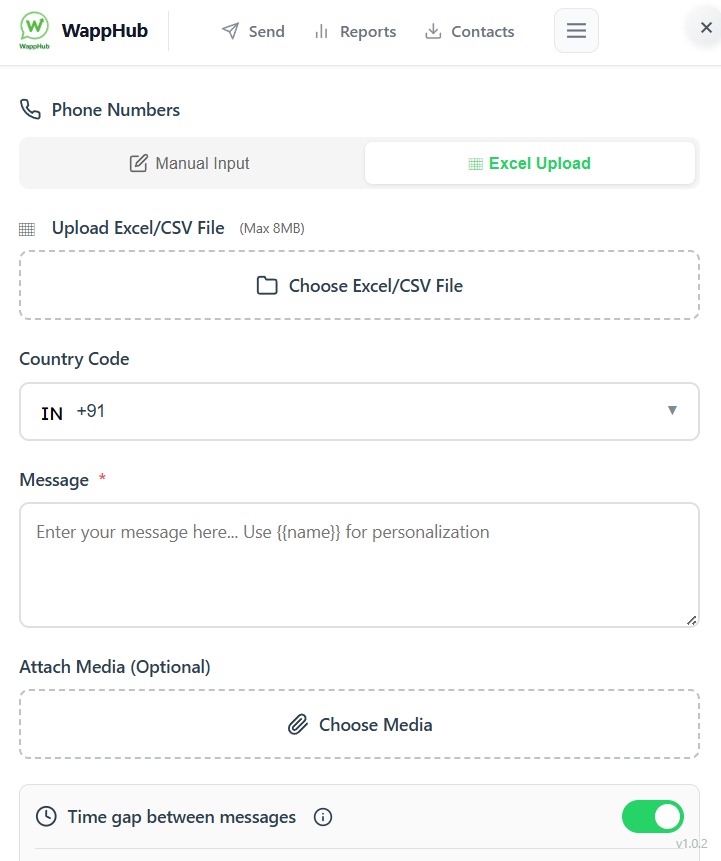
Upload a sheet of up to 8 MB, or type the numbers in by hand.
Map your sheet's columns to variables, so every message carries that contact's own name and details.
Attach media to any campaign. Files are compressed automatically before sending.
Messages go out at a natural pace instead of all at once, which lowers the risk to your number.
Contacts who unsubscribe are skipped in every future campaign. Download the list any time.
See sent, delivered and failed messages, then export the results to Excel or CSV.
Add Bulk Sender to Chrome from the Chrome Web Store. It is free to install.
Log in as you normally do. Bulk Sender opens beside your chats.
Write the message once, check the preview, and start the campaign.
Replies are where sales happen, and where they slip away. Bulk Sender's AI reply assistant will read every reply to your campaign and suggest the best thing to say next, so no warm lead is left waiting.
Suggestions written around what your customer actually asked.
Send a suggestion as it is, or edit it first. Every word stays your call.
Switch on automatic replies and let it answer for you while you plan the next campaign.
Join the early-access list and be the first to try it.
Customer
WhatsApp Web
Saw your Diwali offer! Is the 20% discount valid on bulk orders?
Why businesses trust Bulk Sender
3–7 s
Random gap between messages
Built-in ban protection
Published by the owner of wapphub.com. The Chrome Web Store reports a good publisher record with no history of policy violations.
Messages go out from your own WhatsApp Web session. We never ask for your WhatsApp password.
Contacts who unsubscribe are skipped in future campaigns, and numbers are validated before sending.
Write to contact.wapphub@gmail.com. Business hours are Monday to Friday 9 AM–6 PM and Saturday 10 AM–4 PM.
Pricing
₹499/month
Billed monthly. Free to install.
7-day money-back guarantee
No. Bulk Sender works through your existing WhatsApp Web session, so there is no API approval and no per-message fee.
Cards, UPI, net banking, PayPal and digital wallets, through the secure payment link we send you.
Yes, at any time. Yearly costs 20% less.
PRO has a 7-day money-back guarantee. Email us within 7 days of purchase for a full refund.
Also from WappHub
Replies to your campaigns land in your CRM automatically, so every lead gets a follow-up.