
Also from WappHub
Start conversations with Bulk Sender
Send personalized campaigns from an Excel sheet. Sync Chat then records every reply in your CRM.
WappHub Sync Chat
Sync Chat is a Chrome extension that sends your WhatsApp Web chats to any CRM through a webhook, live as they arrive or for chats and dates you choose.
Free to install · PRO ₹149/month
Features
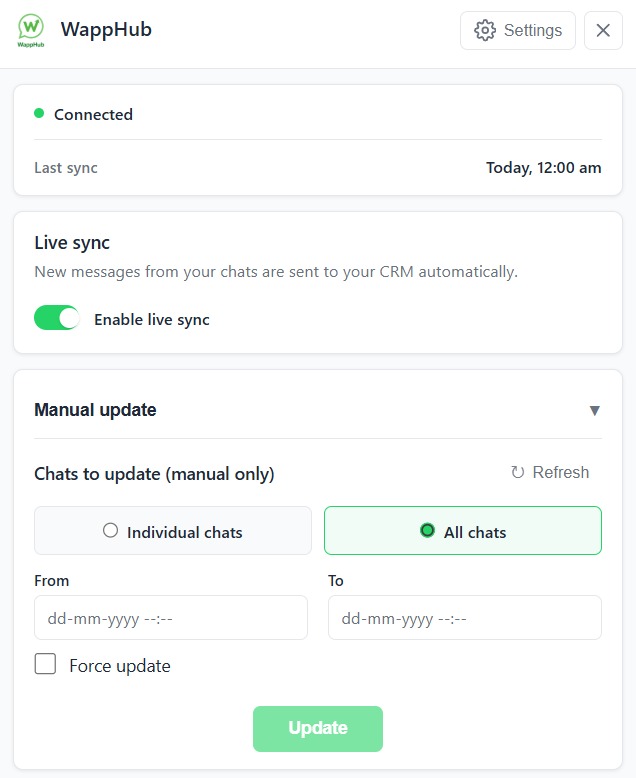
Turn it on and new messages from your selected chats go to your CRM automatically.
Pick individual chats or all chats and a date range, then send them in one go.
Send to any URL with GET, POST, PUT or DELETE, plus your own headers and payload.
Add more than one config and switch each on or off, for different systems or clients.
Messages to or from blocked numbers are never sent to your CRM.
Each sync is encrypted with AES-256-GCM before it leaves Chrome, then sent over HTTPS.
CRM integrations
Sync Chat sends every WhatsApp message to your CRM, on the customer's record. Not technical? Our team sets up the connection with you and checks it works before you rely on it.
 Salesforce
 Zoho CRM
 HubSpot
 Freshsales
 Pipedrive
 Bitrix24
 LeadSquared
 Kylas
Kylas TeleCRM
Tell us which CRM you use. We connect Sync Chat to it with you, so you don't have to touch webhooks or code.
Its name, and what you want saved: new leads, every message, or both.
Directly through your CRM's API, or through a no-code connector such as Make or Zapier where your CRM needs one.
Send a test WhatsApp message and watch it arrive in your CRM. Then switch on live sync.
CRM names are trademarks of their owners. WappHub is not affiliated with or endorsed by them.
Add Sync Chat to Chrome and open WhatsApp Web.
Add your WappHub API key, then paste your CRM's webhook URL and any headers it needs.
Send a test message, check it arrives, and leave live sync running.
Sync Chat already puts every conversation in your CRM. Next, it will help you answer them: an AI assistant that reads the chat and suggests the reply that moves the deal forward.
Smart suggestions appear right inside WhatsApp Web as new messages come in.
Use a suggestion in one click, or edit it until it sounds exactly like you.
Turn on automatic replies when you are ready, and every message still syncs to your CRM.
Join the early-access list and be the first to try it.
Customer
WhatsApp Web
Hi, do you deliver to Pune? I want to order 2 boxes.
Why businesses trust Sync Chat
256-bit
AES-GCM encryption
Applied in your browser, on top of HTTPS
The sync service runs on Amazon Web Services in the Mumbai (ap-south-1) region.
Sync Chat reads from your own WhatsApp Web session. We never ask for your WhatsApp password.
Pick the chats to sync, block numbers you want kept out, and turn live sync off at any time.
Write to contact.wapphub@gmail.com. Business hours are Monday to Friday 9 AM–6 PM and Saturday 10 AM–4 PM.
Pricing
₹149/month
Billed monthly. Free to install.
7-day money-back guarantee
Any CRM or tool that accepts a webhook or API call, such as Zoho CRM, LeadSquared, HubSpot, Freshsales or Salesforce. You can set the URL and payload yourself, or our team connects it with you: setup help is included with PRO.
No. Sync Chat sends one-to-one chats only.
No. Sync Chat reads from your existing WhatsApp Web session, so there is no API approval.
Cards, UPI, net banking, PayPal and digital wallets, through the secure payment link we send you.
Also from WappHub
Send personalized campaigns from an Excel sheet. Sync Chat then records every reply in your CRM.